
10 Ergonomic Keyboard | 2026 Edition

We may earn a commission for purchases made using our links. Please see our disclosure to learn more.
Ever notice your wrists ache or your fingers feel stiff after hours at your desk? You’re not alone. Most traditional keyboards force your hands into awkward angles that put pressure on your wrists and shoulders, leading to strain and fatigue over time. The good news is that switching to an ergonomic keyboard can completely transform your typing experience. Designed to support the natural position of your hands, these keyboards help you type comfortably, reduce tension, and improve posture—so you can focus on your work instead of your wrist pain. In this guide, we’ll help you find the one that perfectly fits your hands, workspace, and workflow.
What Makes a Keyboard “Ergonomic”?
An ergonomic keyboard is designed with one main goal: to help your hands, wrists, and shoulders stay in a more natural, relaxed position while typing. Unlike traditional flat keyboards that force your wrists to twist inward or your fingers to stretch awkwardly, ergonomic keyboards are shaped to fit the natural curve of your body and reduce strain during long hours of work.
Here’s what typically makes a keyboard ergonomic:
- Split or Curved Layout:
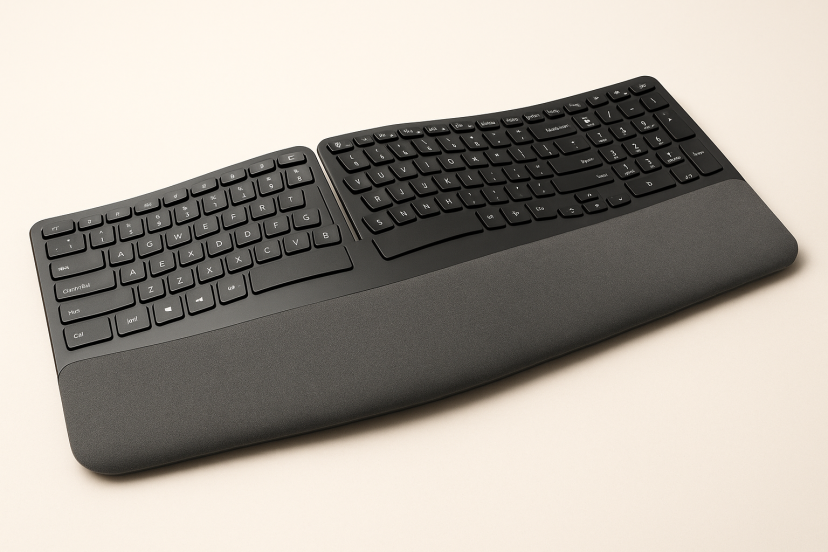
Instead of one straight row of keys, many ergonomic keyboards split the layout into two halves or curve it slightly. This allows your hands to rest at shoulder width, keeping your wrists straight instead of angled inward. - Tented or Angled Design:
Some models raise the middle of the keyboard—known as “tenting”—to reduce forearm pronation (the twisting motion that happens when your palms face down). This helps improve blood flow and comfort. - Cushioned or Adjustable Wrist Rest:
Built-in wrist rests or detachable cushions support your wrists and help maintain a neutral position while typing, minimizing pressure and fatigue. - Key Shape and Sensitivity:
The keys are often sculpted or softly contoured to match the natural movement of your fingers, requiring less force to press. This reduces tension on your tendons and joints.
In short, an ergonomic keyboard isn’t just about comfort—it’s about long-term health. By supporting a more natural hand and arm position, ergonomic keyboards help lower the risk of repetitive strain issues such as carpal tunnel syndrome.
Top 10 Ergonomic Keyboards of 2026
1. Logitech ERGO K860 Wireless Split Keyboard
Why pick it: Premium full-feature ergonomic: curved split layout, large cushioned palm rest, wireless multi-device support.
| Pros | Cons |
| Superb wrist support and comfort | Higher price than many models |
| Quiet, responsive keys | Some users report a learning curve to the split layout |
| Wireless + multi-device pairing | Slightly larger footprint—may not fit very compact desks |
2. Microsoft Sculpt Ergonomic Keyboard
Why pick it: Trusted brand, strong ergonomics especially for Windows users; dome shape plus split layout.
| Pros | Cons |
| Excellent wrist & forearm alignment for long typing sessions | No backlighting |
| Dedicated numeric keypad and clean layout | Bulkier design—less travel-friendly |
| Soft-touch keys, familiar feel | Might feel unconventional if used to standard keyboard layouts |
3. Kinesis Freestyle2 Ergonomic Keyboard
Why pick it: Highly adjustable—split halves allow you to tweak spacing and angle for your shoulders and posture.
| Pros | Cons |
| Maximum layout customization for ergonomics | Numeric keypad often sold separately |
| Light and portable for ergonomics on the go | Might require more setup time to get ideal position |
| Good long-term comfort for heavy typists | More expensive than simple split models |
4. Keychron Q1 HE Wireless Mechanical Keyboard
Why pick it: Mechanical keyboard enthusiasts and ergonomics combined: strong build quality, premium key experience, and more ergonomic layout than standard boards.
| Pros | Cons |
| Premium feel and typing feedback | Price high compared to basic ergonomic keyboards |
| Customizable switches—great for typists who value feel | Might be more than most general users need |
| Compact yet ergonomic design | Mechanical keys often louder |
5. Perixx PERIBOARD‑612 Wireless Ergonomic Split Keyboard
Why pick it: A budget-split wireless option—good entry into ergonomic keyboards without breaking the bank.
| Pros | Cons |
| Affordable split layout wireless design | Fewer adjustment features (less tenting) |
| Quiet key operation, solid value | Build quality and extras less premium |
| Compatible with both Mac & Windows | Less brand recognition and fewer reviews than top brands |
6. Logitech Wave Keys Ergonomic Wireless Keyboard
Why pick it: Offers premium comfort and wireless connectivity at slightly lower cost than top tier models; good mid-tier pick.
| Pros | Cons |
| Comfortable wave-key design and palm rest | Not as adjustable in split/angle as high-end models |
| Wireless convenience and solid brand reputation | Some features may be pared-down compared to flagship ergonomic boards |
| Good value for the functionality | May be less tailored for serious ergonomic use than dedicated split models |
7. Delux GM905DB Wireless Split Ergonomic Keyboard
Why pick it: Very low cost split wireless keyboard—great for first-time ergonomic upgrade or secondary workspace.
| Pros | Cons |
| Budget friendly split layout | Fewer features, build quality lower |
| Wireless convenience for the price | Fewer reviews, less robust ecosystem/support |
| Good for light/moderate typing needs | Might lack long-term durability or premium feel |
8. Arteck Ergonomic Keyboard with Cushioned Palm Rest
Why pick it: Perfect for those who value quiet, comfortable typing and wrist support during long work sessions. The Arteck Ergonomic Keyboard with Cushioned Palm Rest features a sleek, low-profile design with a durable metal frame and soft-touch palm rest that promotes a natural hand position.
| Pros | Cons |
| Cushioned palm rest offers great wrist support | No Bluetooth option (USB only) |
| Quiet, responsive low-profile keys | Limited ergonomic angle adjustments |
| Durable metal construction | Slightly heavier than plastic keyboards |
9. ProtoArc EK01 Advanced Ergonomic Keyboard
Why pick it: The ProtoArc EK01 Ergonomic Keyboard is ideal for multitaskers who switch between devices. With Bluetooth and USB connectivity, a rechargeable battery, and an adjustable tilt, it combines modern functionality with ergonomic comfort.
| Pros | Cons |
| Supports Bluetooth & USB connections for multiple devices | No numeric keypad (compact layout) |
| Rechargeable battery with long life | Slightly smaller keys for some users |
| Adjustable tilt helps reduce wrist strain | Premium features raise the price slightly |
10. X9 Performance Ergonomic Split Keyboard
Why pick it: Designed for everyday comfort, the X9 Performance Ergonomic Split Keyboard offers a true split-key layout that keeps your wrists in a neutral position. It’s plug-and-play via USB and includes a built-in wrist rest, making it a solid ergonomic choice for office professionals.
| Pros | Cons |
| True split design promotes neutral wrist alignment | Wired only—no wireless option |
| Integrated cushioned wrist rest | Larger footprint may need extra desk space |
| Easy plug-and-play USB setup | Keys may feel firmer than laptop-style ones |
Product Comparison Table
| Product | Best For | Key Features | Average Rating |
| Logitech ERGO K860 Wireless Split Keyboard | Premium all-day comfort | Split curved design, cushioned palm rest, multi-device pairing | ⭐⭐⭐⭐⭐ (4.5/5) |
| Microsoft Sculpt Ergonomic Keyboard | Windows users | Dome shape, detachable number pad, soft-touch keys | ⭐⭐⭐⭐ (4.3/5) |
| Kinesis Freestyle2 Ergonomic Keyboard | Maximum adjustability | Independent split halves, lightweight, customizable angle | ⭐⭐⭐⭐⭐ (4.5/5) |
| Keychron Q1 HE Wireless Mechanical Keyboard | Mechanical keyboard lovers | Premium build, customizable switches, ergonomic layout | ⭐⭐⭐⭐⭐ (4.8/5) |
| Perixx PERIBOARD-612 Wireless Ergonomic Keyboard | Budget-friendly ergonomics | Wireless split layout, quiet keys, Mac/Windows compatible | ⭐⭐⭐⭐ (3.9/5) |
| Logitech Wave Keys Ergonomic Wireless Keyboard | Mid-range value seekers | Wave-style curved keys, wireless connectivity, palm support | ⭐⭐⭐⭐⭐ (4.6/5) |
| Delux GM905DB Wireless Split Ergonomic Keyboard | Affordable wireless comfort | Split layout, compact design, lightweight build | ⭐⭐⭐⭐⭐ (4.8/5) |
| Arteck Ergonomic Keyboard with Cushioned Palm Rest | Typing comfort and quiet performance | Cushioned wrist support, low-profile keys, durable metal frame | ⭐⭐⭐⭐⭐ (4.6/5) |
| ProtoArc EK01 Advanced Ergonomic Keyboard | Multi-device users | Wireless rechargeable design, adjustable tilt, Bluetooth + USB compatibility | ⭐⭐⭐⭐⭐ (4.7/5) |
| X9 Performance Ergonomic Split Keyboard | Everyday office ergonomics | Split key layout, integrated wrist rest, plug-and-play USB connection | ⭐⭐⭐⭐ (4.4/5) |
Can an Ergonomic Keyboard Improve Comfort and Posture?
Recent scientific evidence strongly supports the benefits of ergonomic keyboard designs for reducing strain and improving posture during long hours of typing. In a six-month clinical trial on alternative keyboard designs published in the American Journal of Industrial Medicine, researchers found that participants using alternative-geometry keyboards experienced notable improvements in hand comfort and reduced pain compared to those using standard layouts—showing that thoughtful keyboard design can play a key role in preventing repetitive strain injuries. Similarly, a biomechanical study on split keyboard ergonomics published in Applied Ergonomics demonstrated that split keyboard configurations significantly decreased ulnar deviation—the sideways bending of the wrist linked to carpal tunnel risk—bringing hand positioning much closer to a neutral posture. Together, these studies highlight that ergonomic keyboards don’t just feel better—they’re scientifically proven to support healthier wrist alignment and reduce musculoskeletal discomfort, especially when paired with proper desk setup and posture awareness.
How Do You Choose the Best Ergonomic Keyboard?
1. Match It to Your Typing Style
If you’re a heavy typist, look for cushioned key travel or mechanical switches. If you prefer silence, go for membrane-based or low-profile keys.
2. Check the Layout
Split designs are great for shoulder comfort, while curved keyboards offer gentle hand support without a big learning curve.
3. Compatibility Matters
Not all ergonomic keyboards work seamlessly with every operating system. Make sure the one you choose supports your OS shortcuts.
4. Don’t Forget Adjustability
The more tenting or tilt options you have, the better you can personalize your comfort level.
Best Practices for Ergonomic Typing
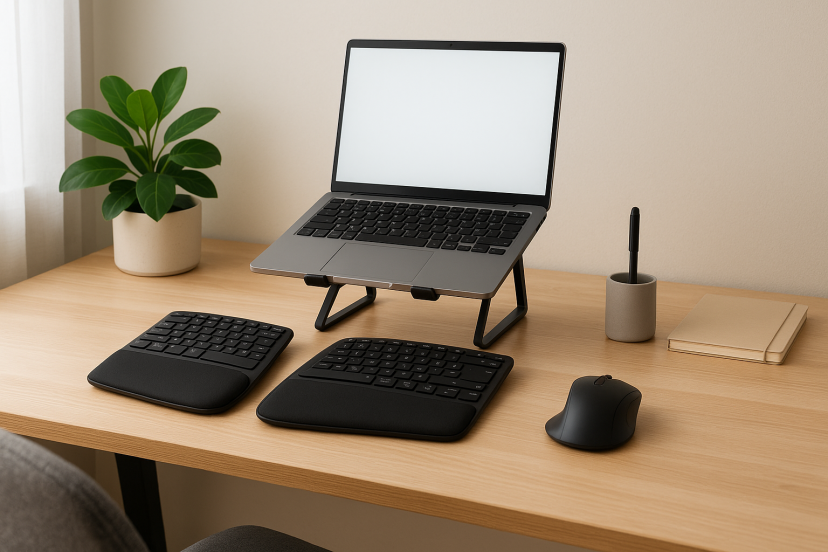
- Keep wrists straight: Avoid bending or resting them on hard surfaces.
- Position your elbows at 90°: It helps maintain proper shoulder alignment.
- Take micro breaks: Take short breaks every 30 to 45 minutes to stretch your fingers, wrists, and shoulders—it’s one of the simplest ways to stay comfortable while you work.
- Pair your keyboard with the right accessories: Adjustable chairs, monitor stands, and ergonomic desk accessories create a cohesive setup.
Conclusion
Your keyboard isn’t just a tool—it’s an extension of your body during work. Investing in an ergonomic keyboard can mean fewer aches, higher productivity, and a more enjoyable typing experience. Whether you choose a premium mechanical model or a budget-friendly split layout, your hands (and shoulders) will thank you.
FAQs
1. Are ergonomic keyboards a good investment?
Definitely! They’re designed to minimize strain, promote healthier posture, and help prevent long-term wrist and hand problems.
2. What’s the difference between a split and curved keyboard?
A split keyboard separates the keys for each hand, while a curved one gently angles them to reduce wrist strain without a full split.
3. Do ergonomic keyboards take time to get used to?
A few days of practice is typical. Once adjusted, most users find typing more natural and comfortable.
4. Can you game comfortably with an ergonomic keyboard?
Absolutely! Many gamers use mechanical ergonomic keyboards for better hand positioning and endurance.
5. When should you replace your ergonomic keyboard?
With regular use, every 3–5 years is ideal—especially if you notice key wear, reduced responsiveness, or discomfort returning.