Work From Bed Without Wrecking Your Back

We may earn a commission for purchases made using our links. Please see our disclosure to learn more.
Work from bed can feel harmless at first. You open your laptop, lean against a few pillows, and settle in, only to notice later that your neck feels stiff or your lower back has started to ache. The issue is rarely the bed itself. It is usually the position your body settles into while you work. A soft mattress, low screen, and poor back support can turn a comfortable setup into an uncomfortable one surprisingly quickly. If working from bed is part of your routine, a few ergonomic changes can make it much easier on your body.
Is Working From Bed Bad for Your Back?
Working from bed does not necessarily mean you will develop back problems. What matters more is your posture, how well your body is supported, and how long you stay in one position.
A mattress behaves very differently from an office chair. Your hips may sink while your upper body leans toward the screen, causing your lower back to round and your shoulders to move forward. Your head may also drift in front of your torso as you look down at a laptop.
You may not notice the strain immediately. An awkward position can feel perfectly comfortable for the first 20 minutes and much less comfortable two hours later.
Research on laptop use in different settings has found that working on beds and sofas can encourage greater neck flexion than using a firmer work surface. That does not mean an occasional afternoon in bed will damage your spine, but repeatedly working in poorly supported positions can contribute to stiffness and discomfort.
How to Work From Bed Without Back Pain
You do not need to turn your bedroom into an office. Most improvements come from addressing three basic problems: back support, screen height, and the position of your keyboard and mouse.
1. Sit Upright With Proper Back Support
Start with your back rather than your laptop.
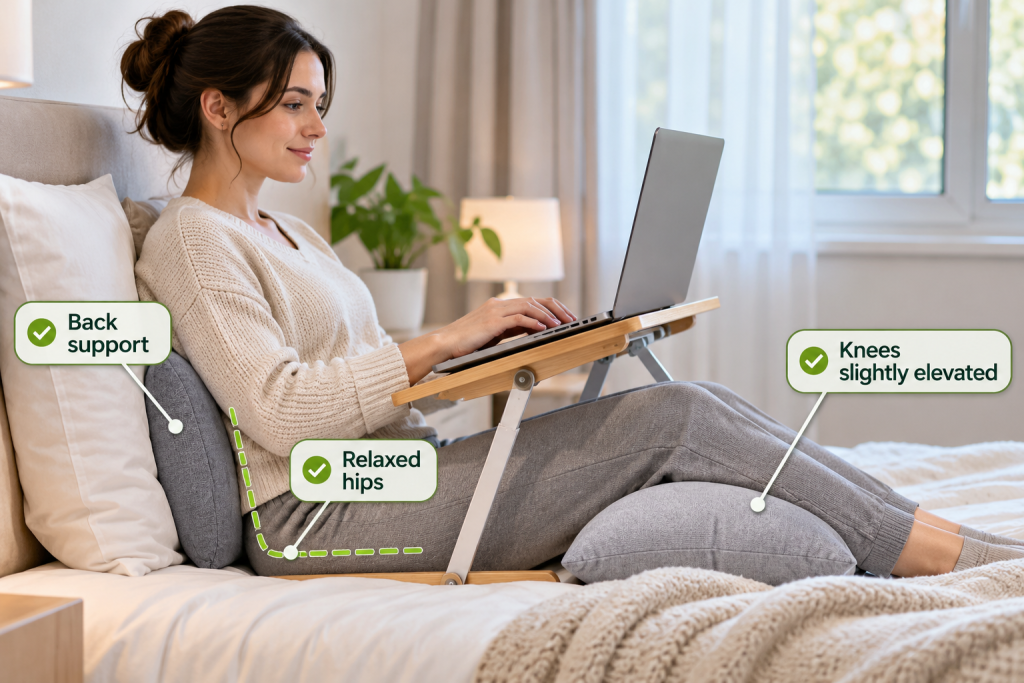
Sit near the headboard or another firm surface instead of working unsupported in the middle of the mattress. Place a firm pillow behind your back, and if there is a gap around your lower back, add a small lumbar cushion or rolled towel.
You are not trying to force your spine into a rigid position. You simply want enough support to prevent yourself from gradually collapsing forward.
A slightly reclined position can also be comfortable as long as your back remains supported and you can see the screen without pushing your head forward. Avoid stacking too many soft pillows, since they tend to compress and leave you slouching again.
2. Keep Your Laptop Screen Higher
A laptop creates an ergonomic compromise because the keyboard and screen are attached. When it rests directly on your thighs, the screen usually sits too low, causing you to lower your head or round your upper back.
A laptop tray, stand, or adjustable bed desk can bring the display closer to a comfortable viewing height. Keep the screen directly in front of you, ideally with the upper part around eye level or slightly below.
For more setup ideas, see these ergonomic laptop stands for improving screen positioning.
Raising the laptop also raises its keyboard, so consider using an external keyboard and mouse for longer work sessions. This allows your screen to stay higher while your hands remain at a comfortable level.
3. Support Your Legs and Hips
Your leg position affects your pelvis, which in turn influences your lower back.
If keeping your legs straight makes your hamstrings feel tight, bend your knees slightly or place a small pillow underneath them. You can also alternate between bent and extended positions during the day.
There is no single perfect position. Choose one that lets your hips relax without forcing your lower back to round. Sitting cross-legged may feel comfortable for a while, but change positions before your hips or knees become stiff.
4. Keep Your Arms Close to Your Body
It is easy to place your laptop too far away when working from bed. You lean forward slightly to type, then a little more as you concentrate, until your shoulders and upper back are carrying unnecessary tension.
Bring your keyboard close enough that your elbows can remain near your sides and your shoulders stay relaxed. Keep your wrists fairly straight rather than bending them sharply against the edge of a tray.
OSHA’s computer workstation guidance recommends keeping the head aligned with the torso, elbows close to the body, and wrists in a neutral position. Those principles still apply when your workstation happens to be a bed.
5. Use a Stable Surface for Your Laptop
Balancing a laptop on blankets may be convenient, but it creates an unstable workspace. The computer shifts whenever you move, and soft bedding can also block ventilation openings.
Use a firm lap desk, laptop tray, or adjustable bed table instead. It should remain steady while you type and provide enough room for your usual equipment.
A small tray may work for answering emails. If you regularly use a mouse, notebook, or other accessories, choose a wider surface so you are not constantly reaching or rearranging things.
Common Working From Bed Mistakes to Avoid
Most discomfort comes from small habits repeated for too long.
Working on your stomach often forces you to lift or turn your head while placing your shoulders and elbows in awkward positions.
Hunching toward your laptop usually happens because the screen sits too low. Instead of moving yourself closer to the computer, raise the computer toward you.
Twisting to reach a bedside table can also become uncomfortable. Keep your mouse, drink, notebook, phone, and charger within easy reach so you are not repeatedly rotating your torso.
Another common mistake is assuming that a comfortable position is automatically a good one. A deep slouch may feel relaxing at first, especially on a soft mattress, while still leaving your neck or lower back poorly supported.
Pay attention to how your body feels after 30 or 60 minutes, not only when you first settle in.

How Long Should You Work From Bed?
There is no universal time limit for working from bed. Your comfort depends on your setup, workload, body, and whether you already experience neck or back discomfort.
Rather than focusing only on posture, make a habit of shifting positions and taking regular movement breaks. Try getting up or changing position every 20 to 30 minutes. Walk to another room, refill your water, or simply stand and move for a moment.
Working from bed is often better suited to lighter tasks such as reading reports, answering emails, reviewing notes, or joining a short meeting. Long writing sessions, spreadsheets, design work, and tasks that require heavy mouse use usually become easier at a desk.
Think of your bed as an occasional workspace rather than the place where your entire workday happens.
Recommended Products for Working From Bed
A few useful accessories can make a bed setup more stable and easier to adjust.
1. SAIJI Adjustable Laptop Bed Tray
The SAIJI Adjustable Laptop Bed Tray provides a firm work surface with adjustable height and angle settings, helping raise your laptop instead of leaving it flat on your thighs.
Best for: Creating a stable laptop setup in bed.
2. LAPGEAR Home Office Pro Lap Desk
This lap desk combines a firm work surface with a cushioned base and space for mouse use, making it useful when you want something more portable than a full bed table.
Best for: Short work sessions and portable laptop use.
3. Logitech Pebble Keys 2 K380s Wireless Keyboard
A separate keyboard lets you raise your laptop while keeping your hands closer to your body. The compact K380s also takes up relatively little space.
Best for: Typing comfortably with a raised laptop.
4. Logitech Pebble Mouse 2 M350s
The Pebble Mouse 2 is compact enough for smaller workspaces. Using a separate mouse can also reduce the need to reach repeatedly toward your laptop’s trackpad.
Best for: Creating a more flexible laptop setup.
5. Cushion Lab Extra Dense Lumbar Pillow
A lumbar pillow can help fill the space between your lower back and a headboard or backrest, providing more structured support than a typical soft pillow.
Best for: Supporting your lower back while sitting upright.
Conclusion
Working from bed can be practical for emails, reading, short meetings, or the occasional change of scenery, but it works best when your body has enough support. Raise your screen, support your lower back, keep your keyboard within easy reach, and move before stiffness starts to build. If you find yourself constantly shifting, stretching, or dealing with recurring discomfort, move to a desk or another supportive workstation. Your bed can be a useful place to work now and then; it just should not leave your body paying for that convenience later.
FAQs
1. What is the best position to work from bed?
Sit upright or slightly reclined with your back supported and your shoulders relaxed. Keep the screen directly in front of you so you do not have to lean forward to see it.
2. Can working from bed cause lower-back pain?
It can contribute to lower-back discomfort if your hips sink deeply into the mattress or your back lacks support. Staying in one position for long periods may also increase stiffness.
3. Is it better to work from bed sitting up or lying down?
Sitting upright with support generally gives you better control over your screen, keyboard, and posture. Lying on your stomach or side often places your neck in a more awkward position.
4. Does a laptop bed tray help with posture?
A laptop tray can provide a stable surface and help raise the screen. For longer typing sessions, pair it with a separate keyboard and mouse.
5. How often should I take breaks when working from bed?
Try changing position or moving every 20 to 30 minutes. Even standing or walking briefly can help reduce stiffness and break up long periods of sitting.