Shrimp Posture: What It Is and How to Fix It
We may earn a commission for purchases made using our links. Please see our disclosure to learn more.
You sit down to work with every intention of keeping good posture. An hour later, your shoulders have rolled forward, your back is curved, and your face is much closer to the screen than when you started. If that sounds familiar, you may be slipping into what people call shrimp posture.
The term describes the curled position many of us fall into while using a laptop, phone, or tablet. It is especially common among students and office workers.
The fix is not to force yourself to sit perfectly straight all day. Instead, make your workspace more supportive, move often, and build habits you can maintain.
What Is Shrimp Posture?
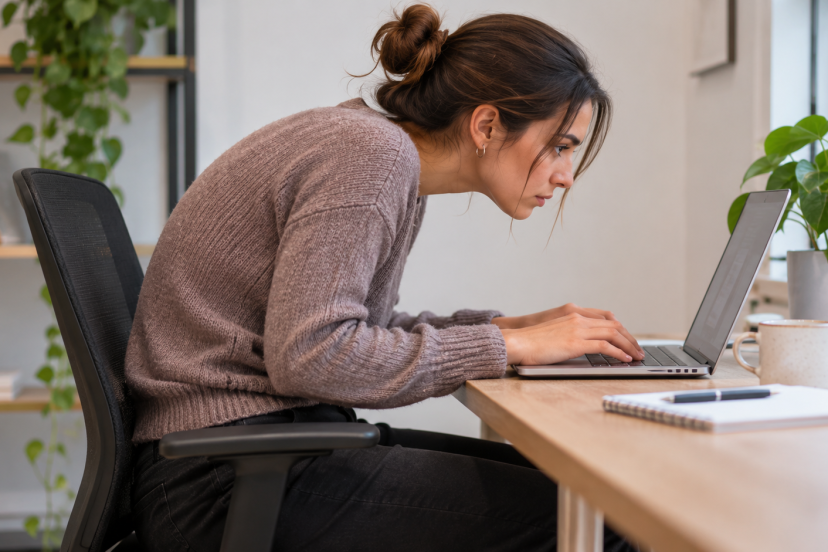
Shrimp posture is an informal term for a hunched sitting position in which the head moves forward, the shoulders round inward, and the upper back curves.
The name comes from the curled shape of a shrimp. It is not a medical diagnosis, but it describes a posture many people recognize immediately.
Common signs include:
- Your head gradually shifts forward instead of staying aligned over your shoulders.
- Your shoulders roll forward while typing.
- Your upper back becomes rounded.
- You lean toward the desk instead of using the backrest.
You may notice it most when concentrating. You start reading on your laptop, lean forward slightly, and stay there for the next 40 minutes without realizing it.
The goal is not to eliminate every moment of slouching. The bigger concern is staying in the same uncomfortable position for too long.
What Causes Shrimp Posture?
Shrimp posture usually develops from a mix of workstation design, screen habits, and fatigue.
1. Spending Hours Looking Down
Phones and laptops often sit below eye level. As a result, you naturally drop your head and bring your shoulders forward to see the screen.
Doing this briefly is unlikely to cause trouble, but long periods may leave your neck and upper back feeling tired.
2. Poor Desk Setup
Sometimes your workstation encourages you to hunch.
A low monitor can make you look downward. A screen that sits too far away may cause you to lean forward, while a keyboard placed too far from your body can pull your shoulders toward the desk.
3. Limited Movement
Even a comfortable posture can become uncomfortable when you hold it for hours.
When you are focused on a deadline or assignment, it is easy to forget to move. Regular position changes matter more than holding one “perfect” posture all day.
4. Muscle Weakness or Fatigue
Your neck, shoulders, upper back, and core help support you while sitting.
As those muscles tire, you may begin leaning into the desk because it feels easier. Your posture may look fine in the morning but very different late in the afternoon.

Signs You May Have Shrimp Posture
Shrimp posture often develops gradually, so you may not notice it while working.
Look for these clues:
- You regularly move your face closer to the monitor.
- Your shoulders round forward when typing.
- You rarely use the chair’s backrest.
- Your neck or upper back feels tired after desk work.
- You often need to stretch after long periods of sitting.
One useful check is to take a side-view photo while sitting normally at your desk. Seeing your usual setup from the side can make these habits easier to spot.
Remember that posture varies between people. You do not need a perfectly straight spine to sit comfortably.
Is Shrimp Posture Bad for Your Health?
Shrimp posture is not automatically harmful, and occasional slouching does not mean you are damaging your spine.
A systematic review on spinal posture and low-back pain found no clear agreement that one particular posture directly causes low-back pain.
Still, posture can play a role in how comfortable you feel. Spending hours hunched forward may contribute to muscle fatigue, stiffness, and discomfort around the neck, shoulders, and upper back.
Persistent pain, numbness, tingling, or weakness should be assessed by a healthcare professional rather than blamed entirely on posture.
How to Fix Shrimp Posture
Improving shrimp posture starts with changing the environment around you. If your desk supports a comfortable position, you will not need to constantly remind yourself to sit straight.
1. Adjust Your Screen Height
Place your monitor directly in front of you, with the top of the screen around eye level or slightly below. Keep it far enough away that you can read comfortably without leaning forward.
Laptop users can raise the computer with a stand and use a separate keyboard and mouse. For more guidance, these ergonomic monitor setup tips explain practical screen height, distance, and placement.
2. Improve Your Sitting Position
Move back into your chair and let the backrest support you.
Keep your shoulders relaxed and place your feet on the floor or a footrest. Avoid forcing your chest forward or pulling your shoulders back aggressively. A relaxed position is easier to maintain.
3. Keep Your Keyboard and Mouse Close
If your keyboard is too far away, your upper body will often follow your hands.
Bring it within easy reach so you can type without stretching your arms forward. Place your mouse beside the keyboard so you do not repeatedly reach forward or sideways.
4. Take Regular Movement Breaks
Movement helps prevent any one posture from becoming uncomfortable.
A systematic review and meta-analysis on micro-breaks found that short breaks can reduce fatigue and improve feelings of energy.
Every 30 to 60 minutes, get up for a short walk, stretch, or simply change position. The goal is simply to break up long periods of uninterrupted sitting.
5. Strengthen and Stretch Your Muscles
Regular exercise can make desk work easier on your body. Focus on movements that strengthen the upper back, shoulders, and core while keeping the chest and neck mobile.
Simple Exercises to Improve Shrimp Posture
1. Chin Tucks
Face forward, then slowly tuck your chin back while keeping your head level. Pause for a moment, release, and repeat 8 to 10 times.
2. Shoulder Blade Squeezes
Relax your shoulders, then gently bring your shoulder blades toward each other. Pause for a few seconds, then relax and repeat the movement 8 to 10 times.
3. Doorway Chest Stretch
Rest your arms along the sides of the doorway, then ease your body forward until you notice a light opening through the chest. Hold for 15 to 20 seconds.
4. Seated Upper-Back Extension
Sit in a supportive chair, rest your hands behind your head, and slowly lean your upper back against the backrest. Come back to your starting position, then perform the movement several more times.
Stop any exercise that causes pain, dizziness, numbness, or unusual discomfort.
Recommended Products for Better Posture
Ergonomic accessories cannot fix posture by themselves, but they can make your workstation easier to use comfortably.
1. Nulaxy C3 Laptop Stand
The Nulaxy C3 raises your laptop screen above desk level, reducing the need to look downward. For a more comfortable setup, pair it with an external keyboard and mouse.
2. VIVO Single Monitor Desk Mount
This adjustable monitor arm gives you more control over screen height, distance, and angle than many standard monitor stands.
3. Everlasting Comfort Lumbar Support Pillow
This memory foam cushion adds lower-back support to chairs that lack comfortable lumbar support.
4. ComfiLife Under Desk Foot Rest
The ComfiLife footrest gives your feet a stable surface when they do not comfortably reach the floor.
5. Logitech Signature K650 Wireless Keyboard
A separate keyboard lets laptop users raise the screen while keeping their hands at a comfortable typing height.
Conclusion
Shrimp posture often begins with something small: leaning closer to read your screen, dropping your shoulders while typing, or staying focused long enough to forget how you are sitting. You do not need to chase perfect posture to improve it. Raise your screen, keep your keyboard close, use your chair for support, and change positions regularly. A supportive workstation gives you a better starting point, but regular movement is what keeps long work and study sessions from turning into hours of stiffness.
FAQs
1. Can shrimp posture be corrected?
Yes. Better workstation setup, regular movement, and simple strengthening exercises can help you develop more comfortable sitting habits.
2. How quickly can you improve shrimp posture?
There is no fixed timeline. Workspace changes may improve comfort quickly, while changing a long-standing habit can take several weeks.
3. Can shrimp posture cause neck pain?
Holding your head forward for long periods may contribute to neck fatigue or discomfort. If the discomfort continues or gets worse, consider speaking with a qualified healthcare professional.
4. Is shrimp posture the same as forward head posture?
Not exactly. Forward head posture refers specifically to the head sitting in front of the shoulders. Shrimp posture also includes rounded shoulders and a curved upper back.
5. What is the best sleeping position for shrimp posture?
There is no single sleeping position that corrects shrimp posture. Choose a position that feels comfortable and supports your head and neck well.