
Ergonomic Wrist Rests: How To Prevent Hand Pain At Work
We may earn a commission for purchases made using our links. Please see our disclosure to learn more.
Hand pain can turn an ordinary workday into a slow grind. You shake out your fingers, change your grip, and by mid-afternoon even simple typing feels uncomfortable. Ergonomic wrist rests can help, but only when you choose the right design and use it correctly.
A wrist rest should not pin your wrists down while your fingers work. Its main job is to support the heel of your palms during pauses, reduce contact with a hard desk edge, and help you return to a straighter wrist position.
What Are Ergonomic Wrist Rests?
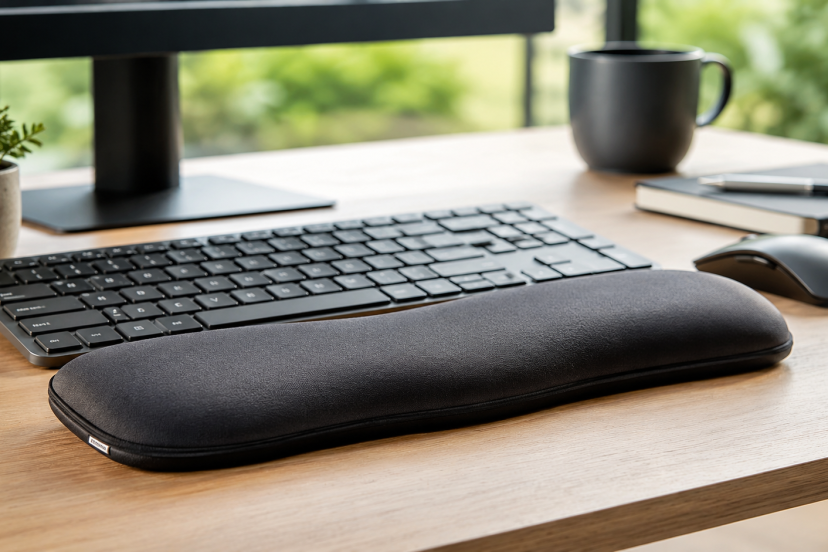
Ergonomic wrist rests are padded or contoured supports placed in front of a keyboard or beside a mouse. Common materials include memory foam, gel, silicone, and fabric-covered foam.
“Palm rest” is often a more accurate name. The support should sit under the fleshy heel of the hand rather than press into the narrow wrist area, where tendons and nerves pass.
Keyboard rests usually span the keyboard’s width. Mouse rests may be built into a mouse pad or designed as a small support that moves with the hand.
How Wrist Position Contributes to Hand Pain
Your wrist works best when it stays close to neutral. In practical terms, your hand should follow the line of your forearm instead of bending sharply upward, downward, or sideways.
A keyboard that sits too high can make you extend your wrists. A distant mouse encourages reaching and side bending. Repeating these positions for hours can add fatigue and contact stress, especially against a hard desk edge.
The OSHA guidance on wrist and palm supports recommends keeping the hands free while typing and using the support during rest periods. It also advises choosing a soft, rounded rest that matches the keyboard’s height and slope.
Do Wrist Rests Actually Work?
They can improve posture and comfort, but they are not a stand-alone cure for hand pain.
A workplace study archived by NIOSH found that wrist-rest use was associated with less wrist flexion among computer operators. However, posture also depended on other workstation and user factors. You can review the research on computer users’ postures and workstation characteristics.
Laboratory research also supports combining support with better keyboard geometry. A curved keyboard with a padded rest reduced wrist extension and side bending without lowering typing speed or accuracy. Participants also reported less fatigue in their hands, forearms, and shoulders. See the curved keyboard posture study on PubMed.
The practical lesson is simple: a good rest may help, but desk height, keyboard angle, mouse placement, workload, and breaks still matter.
How to Use a Wrist Rest Correctly
Support the Palms, Not the Wrists
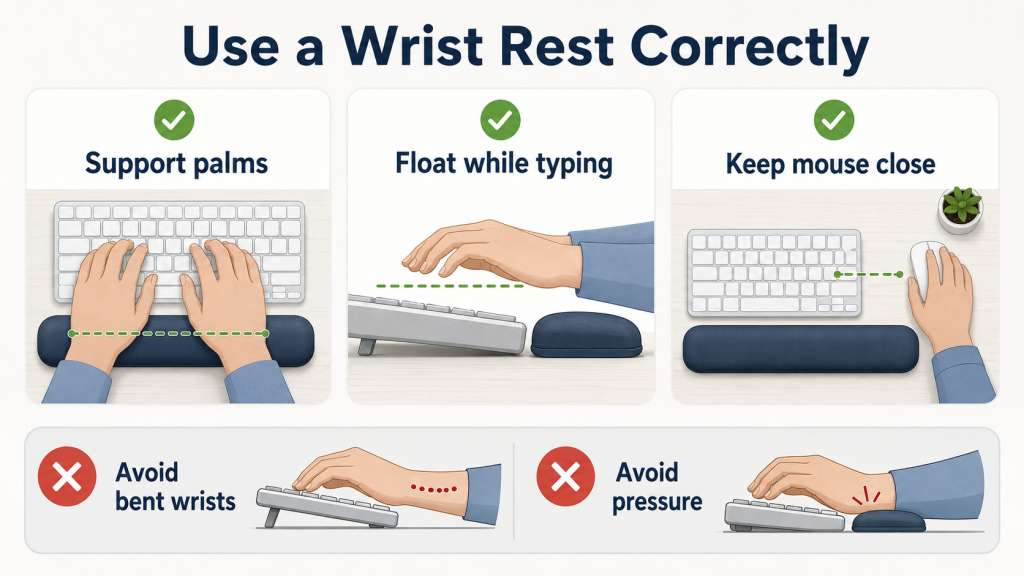
Place the rest under the heel of each palm. Avoid digging its edge into the wrist crease, which can create uncomfortable pressure over time.
The support should feel like a landing area for your hands rather than something that locks them in place.
Float Your Hands While Typing
Let your hands move freely across the keyboard. Do not anchor your wrists to the pad while reaching for distant keys.
Use the rest when you pause, read, review your work, or think between typing bursts. Your hands should remain slightly elevated and mobile during active typing.
Match the Keyboard Height
A thick rest beside a slim keyboard may bend your hands downward. A thin pad beside a tall mechanical keyboard may leave them angled upward.
Aim for a smooth, nearly straight line from your forearm through your hand. The wrist rest should meet the front edge of the keyboard without creating a noticeable step up or down.
Keep the Mouse Close
Keep the mouse close to the keyboard and position both at a similar height. Move from the shoulder and elbow when possible instead of making every movement at the wrist.
For a broader workstation check, read this guide on how to reduce wrist pain with better ergonomics.
How to Choose the Right Wrist Rest
Start with firmness. Very soft foam feels cozy, but it may collapse and leave your hands uneven. Medium-firm support usually gives a better balance of comfort and stability.
Next, check the dimensions. Match the rest to a full-size, tenkeyless, or compact keyboard. Its height should sit close to the keyboard’s front edge.
The cover matters too. Fabric feels breathable, while leatherette wipes clean more easily. Gel often feels cool and stable, although it may feel firmer in a cold room.
A nonslip base is essential. A pad that slides around forces you to keep repositioning your hands and may interrupt your natural movement.
Finally, consider how you work. Writers may prefer a long keyboard rest. Designers and spreadsheet users may benefit more from mouse support. Gamers often need a lower-profile design that does not restrict quick movements.
Pairing your support with one of these ergonomic keyboard options may help you create a more neutral overall setup.
Five Wrist Rests Worth Considering for Your Workspace
The following options suit different keyboard layouts, comfort preferences, and working styles.
1. HyperX Wrist Rest
Cooling gel-infused memory foam provides soft support while helping the surface stay comfortable during long sessions. Anti-fray stitching improves durability, and the nonslip base keeps the pad steady.
Full-size, tenkeyless, and compact versions are available, making it easier to match the rest to your keyboard layout.
Best for: Long typing sessions, gaming, and warm workspaces.
2. Kensington Duo Gel Keyboard Wrist Rest
A firm dual-gel cushion supports the palms, while the central ventilation channel helps reduce heat buildup.
The smooth surface wipes clean easily, making this option practical for shared offices and busy home workstations.
Best for: Users who prefer firm gel support and easy cleaning.
3. 3M Gel Wrist Rest WR310LE
A low-profile gel core offers stable cushioning without raising the hands too far above the keyboard. The smooth leatherette cover also makes routine cleaning simple.
Its long shape pairs well with standard full-size keyboards and traditional office setups.
Best for: Full-width keyboards and professional offices.
4. Razer Ergonomic Wrist Rest
An angled incline and cushioned foam help create a smoother transition between the desk and the front edge of the keyboard.
Several sizes are available for compact, tenkeyless, and full-size keyboard layouts.
Best for: Mechanical keyboards, gaming desks, and users who prefer structured support.
5. DELTAHUB Carpio 2.0
Unlike a fixed pad, this compact support sits beneath the palm and glides across the desk as the mouse hand moves.
Its sliding feet allow greater freedom of movement, although the unusual shape may require a short adjustment period.
Best for: Mouse-heavy work, graphic design, and users who dislike fixed wrist rests.
Other Changes That Help Prevent Hand Pain
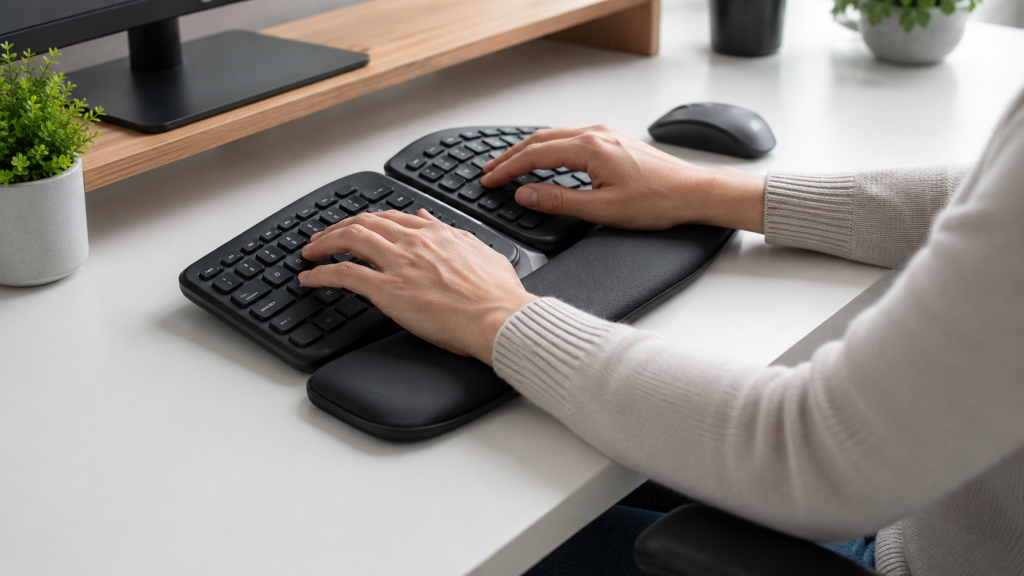
A wrist rest works better when the rest of the workstation supports it. Set the keyboard near elbow height, relax your shoulders, and keep the mouse close enough that your upper arm stays beside your body.
Reduce unnecessary force as well. You do not need to pound the keys or hold the mouse in a tight grip. A slightly faster pointer setting may help you cross the screen with smaller movements.
Pause regularly throughout the day to stretch and move your hands, wrists, and arms. Open and close your hands, straighten your elbows, roll your shoulders, and let your arms hang loosely.
Changing tasks also helps. One long break cannot fully cancel several hours of repeated, uninterrupted movement.
Persistent numbness, tingling, weakness, swelling, or pain that wakes you at night deserves medical attention. A wrist rest may improve comfort, but it cannot diagnose or treat carpal tunnel syndrome, tendon problems, arthritis, or nerve injuries.
Conclusion
Ergonomic wrist rests can make computer work more comfortable by reducing contact with hard desk edges and helping your hands return to a neutral position.
The best option matches your keyboard height, supports the heel of the palm, and stays stable without feeling overly soft. More padding does not automatically mean better ergonomics.
Use your wrist rest as one part of a complete setup. Keep your hands mobile while typing, place the mouse close, relax your grip, and take regular movement breaks. Those habits usually matter more than buying the thickest or most expensive pad.
FAQs
Should My Wrists Touch the Rest While I Type?
Not continuously. Let your hands float and move freely while typing. Use the rest mainly to support the heels of your palms during pauses.
Which is better Gel or Memory Foam for wrist support?
Gel usually feels firmer and cleans easily, while memory foam feels softer and conforms to the hands. Choose the material that keeps your wrists straight without allowing them to sink too deeply.
Can a Wrist Rest Decrease the Chance of Developing Carpal Tunnel?
Ergonomic wrist rests may reduce awkward posture or pressure from the desk edge, but it cannot guarantee prevention. Repetition, force, health conditions, and your overall workstation also affect risk.
What Is the Right Height for a Keyboard Wrist Rest?
Choose a height close to the front edge of your keyboard. Your hand and forearm should form a nearly straight line when you settle onto the support.
When Should I Replace My Wrist Rest?
Replace it when the filling remains compressed, the surface cracks, the base starts sliding, or the shape no longer supports both hands evenly.