Ergonomic Car Seat Setup for Long Trips
We may earn a commission for purchases made using our links. Please see our disclosure to learn more.
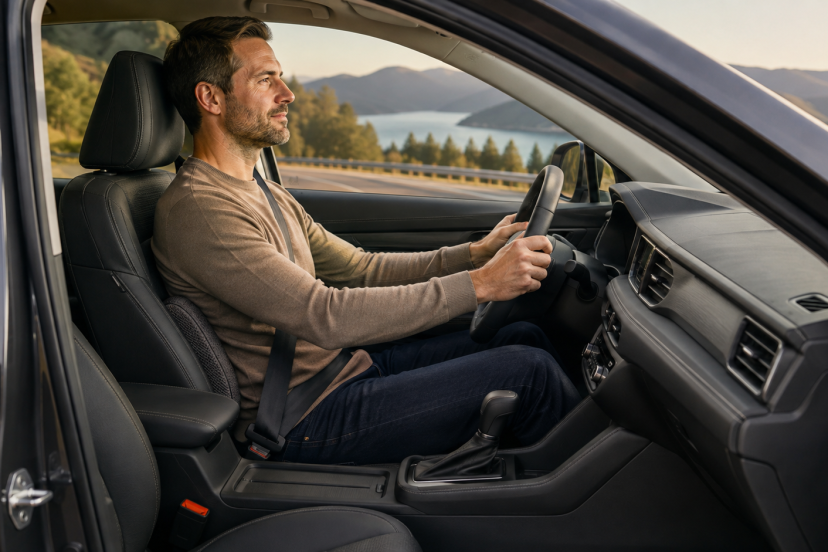
A long drive can turn a small posture problem into hours of back, neck, or hip discomfort. You may start the journey feeling fine, only to find yourself shifting in the seat and stretching your shoulders before the first fuel stop. An ergonomic car seat setup helps the vehicle fit your body instead of forcing your body to adapt to the vehicle. The aim is not to hold one “perfect” pose for an entire trip. Rather, you want a supported position that gives you full control of the car while leaving room for natural movement.
You usually do not need to replace the factory seat. Careful adjustments, sensible breaks, and perhaps one well-chosen support can make a noticeable difference.
Why Driving Comfort Requires More Than a Soft Seat
Driving combines several physical demands. You sit in a confined area, hold your arms forward, operate pedals, watch the road, and absorb movement from the vehicle. A plush seat may feel pleasant initially, but softness alone does not ensure good support.
The National Institute for Occupational Safety and Health identifies static posture, awkward posture, and whole-body vibration as risk factors for lower-back problems. Even a neutral position can cause fatigue when you hold it for too long.
Vehicle vibration adds another concern. A NIOSH investigation found that road type affected vibration exposure and that rough surfaces and speed bumps produced higher levels than smooth freeways. Seat construction also influenced how much vibration reached the driver.
This evidence does not mean that an occasional road trip will damage your back. It does show why support, movement, and a smooth driving style all belong in a sensible ergonomic plan.
Start With the Seat Height
Set the seat high enough to give you a clear view of the road and instrument panel. Keep your hips at roughly the same height as your knees or slightly higher.
Your thighs should rest gently on the seat rather than pressing firmly into its front edge. If the seat pushes behind your knees, reduce the height or flatten the seat-bottom angle. Excessive pressure in this area can make your legs feel uncomfortable.
Check your headroom as well. Leave enough space to avoid feeling crowded, particularly if the car has a low roof. Your ergonomic car seat setup should let you reach the pedals without stretching or lifting your hips.
Set the Correct Distance From the Pedals
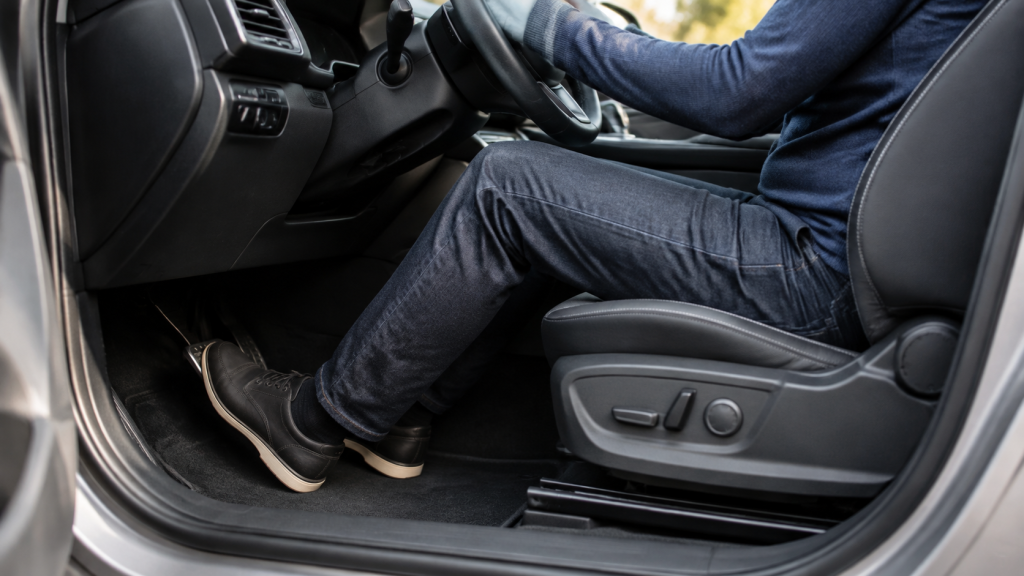
Slide the seat forward until you can fully depress the brake without lifting your hip or stretching your leg straight. Your knee should remain slightly bent at maximum pedal travel.
Next, place your heel on the floor and move your foot between the pedals. You should not need to rotate your entire pelvis or reach with your toes.
Avoid sitting unnecessarily close. Crowding the pedals may raise your knees and limit leg movement. However, sitting too far away encourages you to slide forward and lose contact with the backrest.
Adjust the Backrest and Lumbar Support
Recline the backrest slightly from upright, usually around 100 to 110 degrees. Exact angles vary by vehicle and body shape, so treat this range as a starting point rather than a strict rule.
Keep your shoulders against the backrest while steering. If they lift away whenever you turn the wheel, move the seat closer or bring the steering wheel toward you.
Position the car’s lumbar support in the inward curve of your lower back, near belt level. Use enough pressure to fill the space without pushing your torso forward. For a broader explanation of why unsupported and prolonged sitting causes problems, see this guide to how poor ergonomics affects your health.
If your vehicle lacks adjustable lumbar support, try a thin lumbar roll. Large, thick pillows often overcorrect the curve and create a new pressure point.
Position the Steering Wheel
Set your seat position first, then fine-tune the steering wheel.
Bring the wheel close enough that you can rest your wrists over its top while your shoulders remain against the backrest. When you return your hands to their normal driving position, your elbows should stay comfortably bent.
Angle the steering wheel toward your chest, not your head. Make sure it does not block the speedometer or other critical displays. You must also preserve the clearance recommended in your vehicle manual for safe airbag deployment.
Keep your grip relaxed. Holding the wheel too tightly can tire the hands, forearms, and shoulders.
Set the Head Restraint and Mirrors
The head restraint is a safety feature, not a neck pillow. Position its top near the top of your head and keep it reasonably close to the back of your skull. Follow the vehicle manufacturer’s instructions because adjustment ranges differ.
Set the mirrors after finishing every seat adjustment. You should see the required areas without leaning, twisting, or craning your neck.
Correctly positioned mirrors also provide a useful posture reminder. If the view changes noticeably because you have slumped, sit back against the seat instead of readjusting the mirrors around the slouch.
Run a Five-Minute Pre-Trip Test
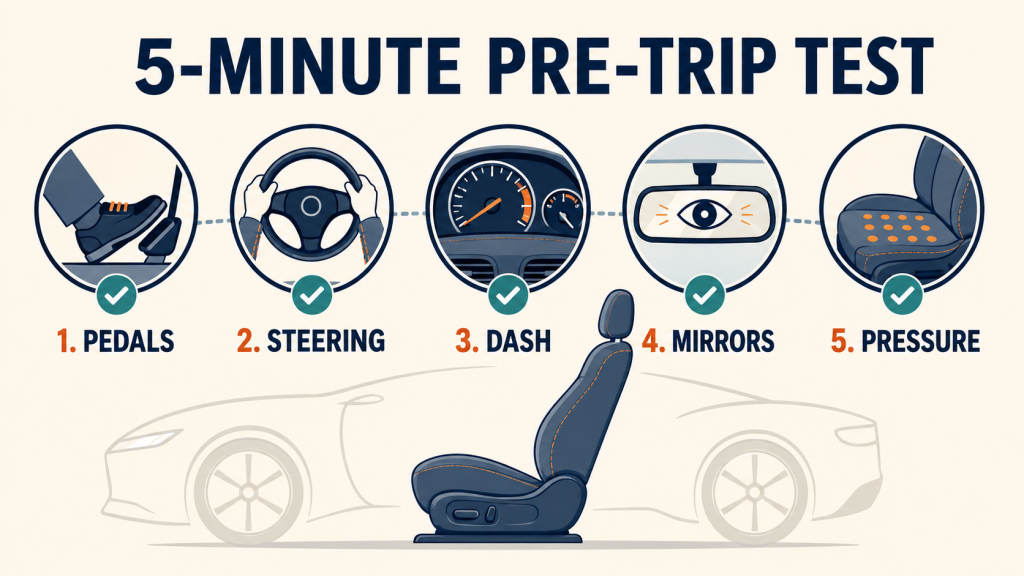
Complete a short test drive before a long journey. Check whether you can:
- Press every pedal without reaching
- Turn the wheel while keeping your shoulders supported
- Read the dashboard without lowering your head
- Check each mirror with a small eye or head movement
- Sit without concentrated pressure under your thighs
- Reach essential controls without twisting
Make one adjustment at a time. When you change several settings together, you may not know which change helped—or created a problem.
The same fitting principles apply beyond the car. This discussion of the long-term benefits of supportive seating explains why adjustability and individual fit matter more than an “ergonomic” label.
Take Movement Breaks During Long Trips
No seat eliminates the effects of staying still. Plan regular stops instead of waiting until your back feels painful or your concentration drops.
A practical approach involves stopping about every two hours, with earlier breaks when discomfort, stiffness, or fatigue appears. Get out, walk for several minutes, gently move your hips and shoulders, and let your eyes focus at different distances.
Do not perform aggressive stretches beside the car. Simple walking and comfortable movements usually make a better reset. If drowsiness sets in, pull over at a safe location and rest. Seat adjustments, open windows, and caffeine cannot replace adequate rest.
Ergonomic Accessories for a More Comfortable Drive
The right accessory should solve a clear comfort or support issue rather than simply add more padding. Choose an ergonomic car seat accessory that solves a specific problem, such as poor lumbar support or an uncomfortable seat angle.
1. ComfiLife Car Seat Cushion
The ComfiLife wedge car cushion combines memory foam with a raised rear profile. It may help shorter drivers improve their view or reduce pressure from a seat pan that slopes too sharply backward.
2. Everlasting Comfort Car Seat Cushion
The Everlasting Comfort car seat cushion uses contoured memory foam and a coccyx cutout. It suits drivers seeking more padding on a firm seat during long trips.
3. QUTOOL Lumbar Support Pillow
The QUTOOL lumbar support pillow provides broader lower-back coverage and adjustable straps. It can help fill a large gap between your lumbar curve and a relatively flat backrest.
4. The Original McKenzie Lumbar Roll
The Original McKenzie lumbar roll offers more focused support than a full-size pillow. Its compact shape makes it easier to position near belt level.
5. Samsonite Lumbar Support Pillow
The Samsonite lumbar support pillow uses contoured memory foam with a ventilated cover. It offers a middle ground between a narrow roll and a large back cushion.
Common Ergonomic Car Seat Mistakes
Adding several cushions at once often creates more problems than it solves. A seat pad plus a thick lumbar pillow can move you too high and far forward.
Other common mistakes include reclining too far, reaching for the steering wheel, placing lumbar support above the waist, and positioning the head restraint against the neck.
Do not put loose objects behind your back or under your thighs. They can shift unexpectedly. Avoid any accessory that changes seat-belt routing or covers controls, sensors, or airbag deployment areas.
Finally, do not ignore persistent symptoms. Pain, numbness, tingling, weakness, or discomfort that continues after the journey deserves advice from a qualified healthcare professional.
Conclusion
A useful ergonomic car seat setup begins with the factory controls. Set the seat height and pedal distance first, then adjust the backrest, lumbar support, steering wheel, head restraint, and mirrors. Test the complete arrangement before leaving, and add only the accessory needed to solve a clear problem. Most importantly, take regular breaks. The best driving posture is a supported one that you do not hold without movement for hours.
FAQs
What is the best angle for a car-seat backrest?
Start with a slight recline of roughly 100 to 110 degrees. Adjust it until your back and shoulders remain supported while you steer comfortably.
Should my knees sit above or below my hips?
Whenever possible, adjust the seat so your hips sit at the same height as, or slightly above, your knees. You should still reach the pedals without stretching or lifting your hips.
Is a lumbar pillow good for long-distance driving?
It can help when the factory seat leaves a gap behind your lower back. Choose a modest thickness and place it near belt level. Remove it if it pushes you forward or increases discomfort.
Can a seat cushion affect driving safety?
Yes. A thick or unstable cushion can change pedal reach, eye height, head-restraint alignment, and seat-belt positioning. Retest the entire setup after adding one.
How often should I stop and rest on a long drive?
Plan a movement break about every two hours, and stop sooner if you feel stiff, uncomfortable, or tired. Personal health needs and driving conditions may require more frequent breaks.