Top 10 Ergonomic Monitor Risers
We may earn a commission for purchases made using our links. Please see our disclosure to learn more.
A monitor that sits only a few inches too low can quietly turn your workday into a marathon of looking down, rounding your shoulders, and rubbing your neck. An ergonomic monitor riser offers a simple fix by raising your screen without requiring a new desk or complicated mounting system. This guide compares ten highly rated monitor stands for home offices, gaming setups, study spaces, and dual-screen workstations. We considered adjustability, stability, storage, materials, customer feedback, and overall value rather than choosing ten nearly identical plastic shelves.
OSHA recommends positioning the top line of your screen at or slightly below eye level. Your monitor should also sit directly in front of you at a comfortable viewing distance.
Our Top Picks
| Product | Best For | Key Feature | Rating | Read More |
| HUANUO Adjustable Monitor Stand | Best overall | Three height settings | ★★★★★ | Read more |
| Amazon Basics Adjustable Riser | Best budget option | Simple stackable design | ★★★★★ | Read more |
| WALI Adjustable Monitor Stand | Best ventilated stand | Metal airflow platform | ★★★★★ | Read more |
| Simple Houseware Organizer Riser | Best for storage | Drawer and side compartments | ★★★★⯪ | Read more |
| BoYata Adjustable Monitor Riser | Best heavy-duty pick | Strong metal construction | ★★★★★ | Read more |
| Hemudu Tempered Glass Riser | Best modern design | Clear glass platform | ★★★★★ | Read more |
| Klearlook Foldable Monitor Riser | Best multifunctional pick | Foldable sides and drawer | ★★★★★ | Read more |
| BONTEC Dual Monitor Stand | Best for two monitors | Adjustable length and angle | ★★★★⯪ | Read more |
| HUANUO Two-Pack Monitor Risers | Best independent dual setup | Two separately adjustable stands | ★★★★★ | Read more |
| BONTEC Two-Tier Wooden Riser | Best wooden option | Storage shelf and cable management | ★★★★⯪ | Read more |
How to Choose an Ergonomic Monitor Riser
Start by sitting normally in your chair and looking straight ahead. The riser should place the top of your screen around eye level or slightly lower without making you lift your chin. For a complete walkthrough, see our guide to creating the correct ergonomic monitor setup.
Also consider your monitor’s weight and base width. A 32-inch display with a wide V-shaped base needs a broader, sturdier platform than a compact office monitor.
Useful features include:
- Height adjustment: Helpful when you are unsure how much lift you need.
- Weight capacity: Especially important for large monitors, printers, and all-in-one computers.
- Storage: Drawers and open shelves can reclaim valuable desk space.
- Ventilation: A mesh platform is useful when the stand also supports a laptop or game console.
- Desk depth: A bulky riser may place the screen too close on a shallow desk.
A riser improves monitor height, but it cannot correct every workstation problem. Your chair, keyboard, mouse, lighting, and desk height still need to work together. Our guide to building an ergonomic home office on a budget covers those adjustments in more detail.
Top 10 Ergonomic Monitor Riser Reviews
1. HUANUO Adjustable Monitor Stand Riser

Best for: Most home and office setups
The HUANUO HNLL3 earns our top spot because it covers the essentials without becoming bulky or expensive. Its ventilated metal platform offers three height settings, while the open space underneath can hold notebooks, a compact keyboard, or everyday desk accessories.
The stand supports up to 44 pounds and has anti-slip feet for stability. Its platform is relatively compact, however, so measure unusually wide monitor bases before ordering. The product has accumulated strong feedback from thousands of customers.
Key features: Three adjustable heights, metal platform, airflow vents, 44-pound capacity.
Pros: Sturdy, easy to assemble, compact and affordable.
Cons: The narrow platform may not suit oversized monitor bases.
2. Amazon Basics Adjustable Monitor Riser

Best for: Shoppers who want a simple budget riser
The Amazon Basics stand skips drawers, decorative finishes, and complicated hardware. Instead, you get a straightforward platform with stackable leg sections that let you experiment with different screen heights.
It supports devices weighing up to 22 pounds and leaves useful storage room underneath. The molded plastic construction is not as polished as metal or wood, but it is lightweight, stable, and backed by a large volume of positive customer feedback.
Key features: Adjustable stackable legs, 22-pound capacity, lightweight plastic construction.
Pros: Excellent value, quick setup and adjustable height.
Cons: Less premium-looking than metal or wooden risers.
3. WALI Adjustable Monitor Stand Riser

Best for: Monitors, laptops and heat-producing electronics
The WALI STT003 is similar in concept to the HUANUO, but it is a worthwhile alternative when you want a ventilated platform with three adjustable height levels. Its metal surface supports up to 44 pounds and provides room underneath for office supplies.
The height changes by pressing the buttons on the legs, making it easier to test several positions. Customer feedback is particularly strong for stability, value and uncomplicated assembly.
Key features: Three height levels, ventilated metal surface, non-slip feet.
Pros: Strong value, good airflow and generous capacity.
Cons: The industrial metal design may look plain in decorative offices.
4. Simple Houseware Monitor Riser With Drawer

Best for: Cluttered desks and paper-heavy workspaces
This Simple Houseware riser does more than elevate a screen. It includes a sliding drawer, side compartments and enough clearance underneath for many keyboards and notebooks.
Its metal construction feels more substantial than a basic plastic shelf, although its fixed height gives you less control over screen positioning. At just over 20 inches wide, it also occupies more space than compact models.
Key features: Sliding drawer, side organizers, metal frame, wide platform.
Pros: Excellent storage, sturdy design and no complicated adjustment system.
Cons: Fixed height and relatively large footprint.
5. BoYata Adjustable Monitor Riser

Best for: Heavy monitors and premium-looking setups
The BoYata riser uses a broad metal base and adjustable support column rather than four lightweight legs. This creates a solid platform for larger monitors, laptops, printers and other equipment weighing up to approximately 33 pounds.
Its biggest strength is stability. The trade-off is weight: this is not the riser you will casually move between rooms every afternoon. Customer feedback frequently highlights its sturdy construction and polished appearance.
Key features: Adjustable height, metal construction, wide base, anti-slip padding.
Pros: Very stable, attractive and suitable for heavier equipment.
Cons: Heavier and usually more expensive than basic risers.
6. Hemudu Tempered Glass Monitor Riser

Best for: Minimalist and modern workspaces
A large black platform can make a small desk feel visually crowded. The Hemudu tempered glass riser avoids that problem with a clear surface and slim stainless-steel legs.
The stand supports up to 44 pounds and offers adjustable height, depending on the selected configuration. Tempered glass is easy to wipe clean, although fingerprints and dust show more readily than they do on mesh metal.
Key features: Tempered glass platform, adjustable legs, 44-pound capacity.
Pros: Modern appearance, strong capacity and easy cleaning.
Cons: Shows fingerprints and may not suit rough, high-traffic environments.
7. Klearlook Foldable Monitor Riser

Best for: Small desks and multifunctional workspaces
The Klearlook combines a monitor shelf, small drawer, phone holder and adjustable-width platform. Its folding side sections let you shorten or expand the stand as your desk arrangement changes.
It arrives largely assembled and supports substantial weight for an ABS riser. The small accessory drawer is handy for flash drives and paper clips, though it is not deep enough for bulky supplies.
Key features: Adjustable width, folding design, drawer, phone and tablet slot.
Pros: Versatile, tidy and easy to reposition.
Cons: Plastic construction feels less premium than metal or wood.
8. BONTEC Dual Monitor Stand Riser
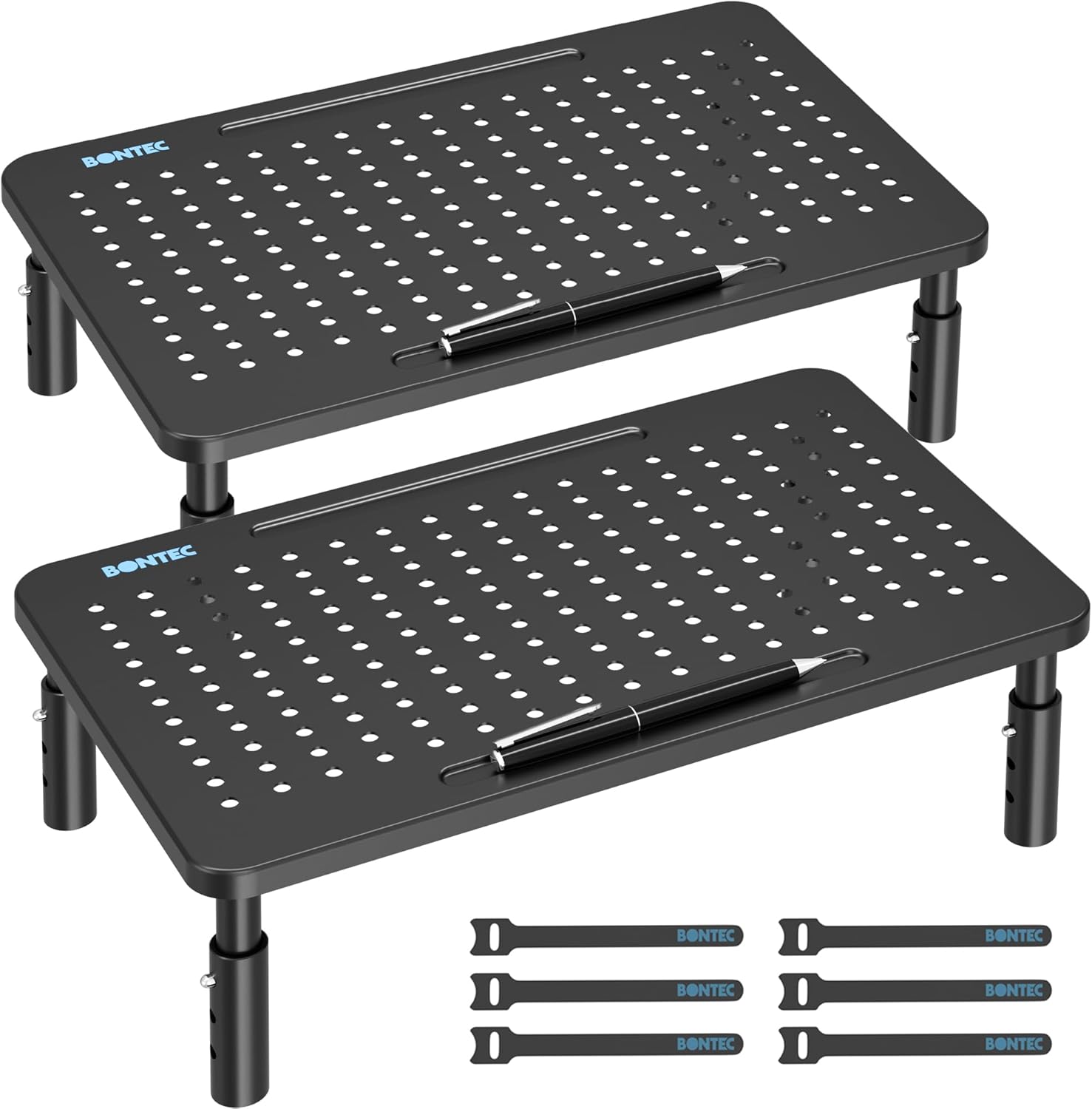
Best for: Wide dual-monitor workstations
The BONTEC dual riser uses three connected sections that can be widened, narrowed or angled. This makes it useful for two monitors, a monitor-and-laptop combination, or a curved corner-desk layout.
Open storage underneath can hold a keyboard, dock, console or notebooks. Assembly takes longer than with a single-piece stand, and the engineered-wood panels should be kept dry. Still, its flexible layout makes it one of the most useful options for multi-screen users.
Key features: Adjustable length and angle, three sections, phone holder, storage space.
Pros: Flexible layout, wide surface and attractive finish.
Cons: Requires assembly and occupies considerable desk width.
9. HUANUO Two-Pack Monitor Risers

Best for: Independently positioning two screens
Some dual-monitor shelves force both screens to sit at the same height and angle. This HUANUO two-pack gives each monitor its own adjustable metal platform, making it easier to compensate for different monitor sizes or stand designs.
The separate platforms also let you place one screen directly in front of you and angle the secondary screen inward. The downside is that two individual stands use more desk surface than a mounted monitor arm.
Key features: Two risers, three height settings per stand, ventilated platforms.
Pros: Independent adjustment, strong value and flexible placement.
Cons: Four sets of legs can make a small desk feel crowded.
10. BONTEC Two-Tier Wooden Monitor Riser

Best for: Wooden desks and warmer office décor
The BONTEC two-tier stand is a welcome break from black plastic and perforated metal. Its engineered-wood construction includes an open storage shelf, cable-management features and a slot for a phone.
The fixed height works well when it matches your body and desk, but it offers no fine adjustment. Measure carefully before buying, particularly if your monitor already has a tall factory stand.
Key features: Two-tier wooden design, cable management, phone holder, 66-pound capacity.
Pros: Attractive finish, substantial capacity and practical storage.
Cons: Fixed height and assembly required.
Final Thoughts
The HUANUO adjustable monitor stand riser is the best ergonomic monitor riser for most people because it combines useful height adjustment, strong construction, ventilation and dependable value. Choose the Simple Houseware model when storage matters most, the BoYata for heavier equipment, or the BONTEC dual stand for a wide two-screen setup. Whatever style you select, measure your monitor base and desk first—the right riser should fit your workspace while placing the screen at a comfortable height, not simply make it taller.
Frequently Asked Questions
Are monitor risers actually ergonomic?
A monitor riser can improve ergonomics when it places the screen directly in front of you with the top at or slightly below eye level. It will not fix an uncomfortable chair, poor keyboard position or excessive screen distance on its own.
How high should an ergonomic monitor riser be?
The correct height depends on your desk, chair, body height and monitor stand. Sit upright, look straight ahead and choose a riser that positions the top of the display around eye level or slightly lower.
Is an adjustable monitor riser better than a fixed one?
An adjustable model is safer when you are unsure how much elevation you need. A fixed riser can work equally well when its height already matches your workstation.
Can a monitor riser hold two monitors?
Only use a riser that is wide enough and rated for the combined weight of both screens. Dual-monitor shelves and two-pack risers usually provide better alignment than placing two displays on a narrow single stand.
Is a monitor riser better than a monitor arm?
An ergonomic monitor riser is easier to install and often adds storage. A monitor arm provides greater control over height, distance, tilt and rotation, but it requires a compatible monitor and a desk strong enough for the clamp or grommet mount.